
How to Search FPDS: How Small Businesses Find Who Buys What They Sell (part 2)
How to Search FPDS: How Small Businesses Find Who Buys What They Sell (part 2)
How to Search FPDS (Federal Procurement Data System) – Part 2: How to Find Who Buys What You Sell
By Neil McDonnell, President, GovCon Chamber of Commerce (updated 3 Dec 2025)
If you're a small business selling to the federal government, getting clear answers to a few basic questions is often the difference between chasing leads and pursuing real opportunities:
- Which agencies buy what you sell?
- Who are the incumbent contractors?
- When will contracts be recompeted?
- Where should you focus your limited business development time?
FPDS unlocks all the data and background you need for your pipeline.
When you learn how to search it correctly, you can build a focused, realistic pipeline for 2026 and even 2027.
This is Part 2 of the FPDS series. Part 1 introduced the system. Read: Introduction to the Federal Procurement Data System (FPDS) – Part 1.
👉 FPDS research is an essential part of our 7-Step Process for Government Contracting Success
Today I will show you how to search FPDS to get actionable data. Follow along step-by-step, using the same techniques demonstrated in my live training video (below)..
This government contracting training teaches how to:
- Use FPDS' Advanced Search tools effectively
- Search by Description of Requirements
- Identify recompetes using Estimated Completion Date
- Filter by type of set-aside
- Follow contracting officers by email and by office IDs
- Follow incumbent contractors using their UEIs
- Use PSC and NAICS codes to find related work
- Build the foundation of a 2026–2027 pipeline from award history
Why is FPDS So Important to Government Contractors for 2026–2027?
FPDS is the federal government’s primary system for recording contract awards. Nearly every award over $10,000 appears here, and the transparency it provides is unlike anything available in the commercial world. [
FPDS shows you who buys what you sell
- You can see which agencies and offices purchase your type of product or service, how often they buy it, and who they buy it from.
FPDS shows you who sells what you sell
- You can identify companies that already hold contracts in your niche. Some will be competitors. Some may become your most credible teaming partners.
FPDS shows you which contracts will be recompeted
- Five-year contracts ending in 2026 are likely already entering market research and planning now. FPDS helps you see which work is nearing the end of its period of performance.
FPDS helps you build a realistic, evidence-based pipeline
- FPDS is not speculative. It shows what agencies have actually awarded, making it much easier to forecast what they are likely to buy again.
FPDS: The 80% Tool for Small Business Pipeline Building
FPDS is your 80% tool. It gives small businesses almost everything you need to build a real pipeline.
By mastering a few core search skills, you can identify buyers, incumbents, complementary partners, and upcoming recompetes—without paying for expensive third-party tools.
What FPDS Is (and Isn’t)
What FPDS is
- A summary of awarded federal contracts
- Updated continually by contracting officers
- Public, searchable, and free to use
- A source of award history and past performance signals
- A window into who buys what, when, and from whom
What FPDS is not
- A place to find Performance Work Statements (PWS) or full technical requirements
- A forecasting system for future requirements
- A list of upcoming solicitations
- A repository of contract attachments or documents
FPDS tells you what has been bought so you can understand what will likely be bought again.
• Watch my live webinar: "How to Search FPDS – the Federal Procurement Data System (live training for Small Business Government Contractors)
Follow along with the training to learn the core skills every small business should learn before moving further into advanced FPDS techniques.
Basic FPDS Search Skills (Step-by-Step)
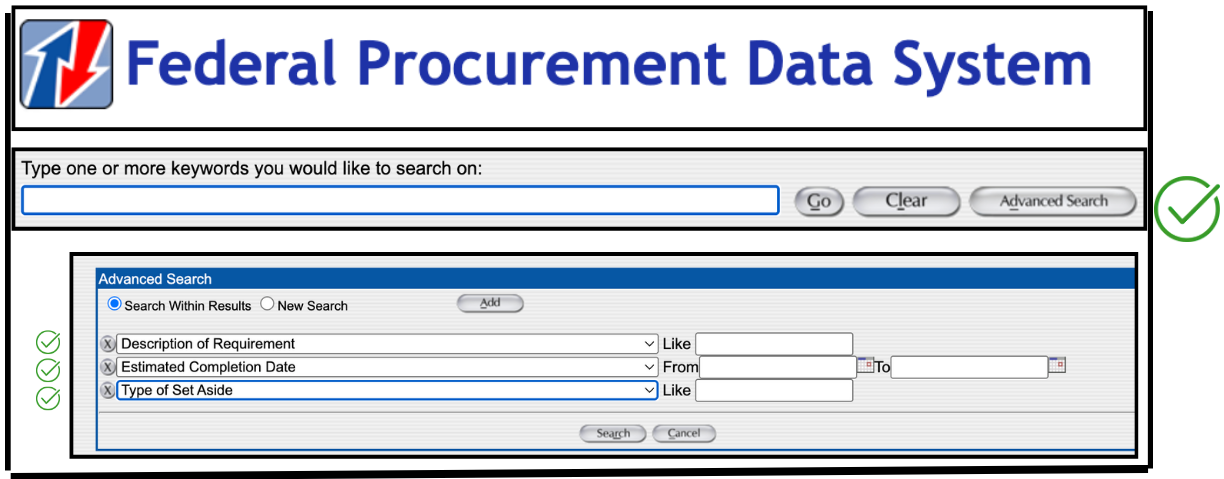
Step 1: Advanced Search
Skip the main search box on the FPDS homepage. Go straight to:
Advanced Search → New Search
This is where real FPDS research begins. Advanced Search allows you to control which fields you are searching and how the results are filtered.
Step 2: Description of Requirements
“Description of Requirements” is the first field to master. [
This field contains the short summary written by the contracting office about what the contract covers. When you search here, you are looking at the actual language used to describe the award. Examples:
- Search “water intrusion” in Description of Requirements to see awards tied to water intrusion work.[
13:36 - Search “water intrusion” across all fields brings back a lot of noise. [
14:45
Step 3: Estimated Completion Date
Estimated Completion Date is one of the simplest ways to find contracts coming up for recompete.
- Set a filter such as: Estimated Completion Date = 2026 [
17:18 - Use this filter to chose contracts scheduled to end next year. Many of these are already being evaluated internally and will be re-competed.
Step 4: Type of Set-Aside
Type of Set-Aside filters help you focus on opportunities aligned with your eligibility.[
- 8(a)
- WOSB
- SDVOSB
- HUBZone
- Full and Open
- Other Than Small
Combining Type of Set-Aside with Estimated Completion Date gives you a targeted list of upcoming opportunities that are both expiring and aligned with your status.
Step 5: Search Criteria Panel
On the right side of FPDS, you’ll see a panel listing the filters you have applied. This is the search criteria panel and it shows the query FPDS is running based on your selections.
You do not need to memorize the underlying query language. As you work with FPDS, you will naturally become familiar with the important fields and how they behave.
Advanced FPDS Search Skills
Once you are comfortable with the basics, these advanced techniques allow you to extract far more value from FPDS.
Technique 1: Follow the Contracting Officer
Every award record includes the contracting officer’s name and often their email address.
Copy the KO email → paste it into the FPDS search bar → run the search.
This shows every award that officer has managed, giving you insight into their buying patterns, contract types, and the programs they support.
Technique 2: Follow the Contracting Office ID
Agencies use office-specific IDs to group awards under particular commands or branches. [
Searching by office ID reveals:
- all awards issued from that office
- the size of those awards
- the types of work they buy
- how frequently they buy it
Technique 3: Follow the Incumbent Contractor (UEI Search)
Find a successful contractor (competitor) and search by their UEI (Unique Entity Identifier) to see all the contracts they have won [
You can find
- every award that contractor has received
- their major customers across government
- the size and type of their contracts
- the scope of their presence in the federal market
This helps you understand whether they are a competitor you need to study more closely, or a potential teaming partner already trusted by agencies you care about.
Technique 4: Follow the PSC or NAICS
Descriptions can vary, but PSC codes stay consistent. [
When descriptions use different language, the PSC often reveals additional opportunities you might otherwise miss.
Technique 5: Search Within Results
FPDS allows you to search within your current set of results.
After you run a search, you can choose to refine within those results by adjusting filters, instead of starting from scratch. This is useful when you want to progressively narrow a broad dataset by:
- year
- set-aside type
- office ID
- PSC
- dollar value
Technique 6: Identify Complementary Partners
Some of your best teaming partners are not direct competitors. They are complementary firms serving the same buyers with adjacent services.
Using FPDS, you can identify:
- firms already supporting the agencies you care about
- companies holding large contracts where your work would fit as a subcontractor
- partners who can introduce you to programs and offices they already serve
Review these Micro-Tutorials from the Training
Example: 8(a) Recompetes Ending in 2026
Use these settings in Advanced Search:
- Estimated Completion Date = 2026
- Type of Set-Aside = 8(a)
This produces a list of 8(a) contracts scheduled to end in 2026, giving you a clear starting point for recompete planning.
Example: Water Intrusion Search
Use this setting:
- Description of Requirements = "water intrusion"
Then follow the data:
- identify the PSC for water intrusion work
- copy and search the contracting officer’s email address
- copy and search the incumbent contractor’s UEI
This reveals buyers, potential partners, and related requirements you might otherwise miss.
FPDS Limitations (What It Does Not Provide)
FPDS is powerful, but it has limits you should understand:
- No Performance Work Statements (PWS) or full technical documents
- No complete scopes of work
- No future solicitations or forecasts
- Limited information on actions under $10,000
- No subcontracting details
- No evaluation factors or scoring
FPDS is a summary-level award system. It is best used for understanding buyers, incumbents, and recompetes, not for replacing detailed market research or solicitation documents.
Common FPDS Mistakes to Avoid
- Using the main search box instead of Advanced Search
- Searching across all fields instead of the correct field
- Ignoring the Description of Requirements field
- Failing to use Estimated Completion Date to find recompetes
- Skipping set-aside filters that align with your status
- Not following the contracting officer or office ID
- Not searching by incumbent UEI
Mastering the basics prevents wasted time and inaccurate conclusions.
When to Use FPDS vs SAM.gov vs USAspending.gov
FPDS (Federal Procurement Data System)
- Best for: award history, buyer patterns, incumbents, recompetes, UEI research
- Purpose: support acquisition tracking and transparency
- Strength: field-level detail for real federal sales strategy
SAM.gov (Contract Opportunities)
- Best for: current RFIs, pre-solicitations, and active solicitations
- Purpose: announce upcoming requirements
- Strength: future opportunities, not award history
USAspending.gov
- Best for: big-picture spending summaries and trend analysis
- Purpose: public transparency and visualization
- Strength: user-friendly dashboards, not detailed contract research
If you need to know who buys what you sell, FPDS is the correct tool.
Practice Exercises
To build confidence, practice these tasks inside FPDS:
- Search “water intrusion” under Description of Requirements
- Find contracts with Estimated Completion Date in 2026
- Filter 8(a) or SDVOSB awards expiring in 2026
- Copy a contracting officer’s email and see all their awards
- Copy a UEI from an award and view that contractor’s entire footprint
Practice is what turns these steps into a repeatable skill.
Related Resources to Bookmark
FAQ: FPDS Search for Small Businesses
How do I use FPDS to see which agencies buy what I sell?
Use Advanced Search and start with the Description of Requirements field. Enter a keyword directly tied to your service or product, then refine your results by Agency ID, PSC, or NAICS. This shows you which agencies and offices are already buying what you offer.
How do I find incumbent contractors in FPDS?
Open a relevant FPDS award and copy the UEI of the winning contractor. Run a new search using that UEI. FPDS will display every award that contractor has received, making it easy to see who the incumbents are and where they are winning work.
How do I identify contracts coming up for recompete?
Use the Estimated Completion Date field. Set it to the year you are targeting (for example, 2026). Contracts ending in that year are likely being evaluated for recompete, making them strong candidates for your pipeline.
Can FPDS be used for 2026–2027 pipeline planning?
Yes. FPDS is one of the best tools for early-stage pipeline planning. It shows you which contracts are expiring, which offices buy your services, and how much they have awarded. Your 2027 revenue should be identified and pursued in 2026, and FPDS helps you do that with real data.
Does FPDS contain Performance Work Statements (PWS) or the full scope of work?
No. FPDS contains summary award information only. It does not include PWS documents, requirement packages, or detailed technical scopes of work.
How current is FPDS data?
FPDS data is updated by contracting officers at the time of award and refreshed continually. It is one of the most reliable sources for current federal award information.
Can I search FPDS by contracting officer?
Yes. Copy the contracting officer’s email address from any FPDS award and paste it into the FPDS search bar. The results will show every award that officer has managed, giving you a sense of their buying history and focus areas.
Can FPDS help me find teaming partners?
Yes. By searching by PSC, Description of Requirements, or UEI, you can identify companies that deliver related services to the agencies you care about. Many of these firms can become potential primes or subcontractors in your teaming strategy.
What is the difference between FPDS and USAspending.gov?
FPDS and USAspending.gov pull from the same underlying award data, but they serve different purposes. FPDS is designed for contracting professionals and provides more granular, field-level detail for research. USAspending.gov is designed for public transparency and visualization, offering higher-level summaries and dashboards. FPDS is the better tool for detailed contract research and recompete identification.
What is the difference between FPDS and SAM.gov?
SAM.gov focuses on current and upcoming contract opportunities, including RFIs, pre-solicitations, and solicitations. FPDS focuses on awards that have already been made. SAM.gov shows you what might be coming. FPDS shows you what has been bought and what is likely to be bought again.
What is the most powerful way for a small business to use FPDS today?
Combine three key fields in Advanced Search:
- Description of Requirements
- Estimated Completion Date
- Type of Set-Aside
Together, these reveal agencies that buy your services, upcoming recompetes, and realistic opportunities aligned with your eligibility. This combination alone can build most of your 2026–2027 pipeline.
About the Author: Neil McDonnell
Neil McDonnell is the President of the GovCon Chamber and founder of CallPlan.ai. A leading federal sales expert and experienced technology government contractor, Neil has delivered nearly 700 daily LinkedIn Live federal sales trainings since 2018. He is widely recognized as a trusted voice for small business government contractors committed to building repeatable, predictable results in the federal market. Neil teaches small businesses how to build relationships, make effective cold calls, and use SAM.gov and FPDS strategically to create a repeatable, evidence-based federal contracting process.
GovCon Chamber

Neil McDonnell | President
Founder, CallPlan.ai & Co-Founder GovCon in a Box
Neil brings 20+ years experience as a small business federal contractor, personally winning and supporting numerous government contracts for the US Army, Navy and Air Force, HHS, VA, DOT, DOI, DOE, the Executive Office of the White House and numerous large prime contractors.
OUR COMMITMENT
We are committed to helping small business owners build strategic relationships with federal buyers and potential teaming partners that lead to federal contracting revenue.
- 8(a) certified small business owners
- women-owned small businesses (#wosb)
- veteran-owned (#vosb) and
- service-disabled veteran-owned small businesses (#sdvosb)
Recent Posts
